
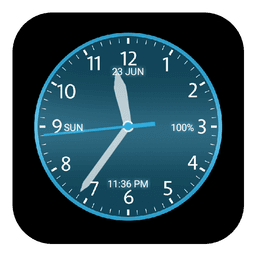
Screenshots
Analog Clock के बारे में
Analog Clock आपकी होम स्क्रीन पर एक अनुकूलन योग्य घड़ी लगाता है, जो क्लासिक एनालॉग डिज़ाइन को आधुनिक डिजिटल सुविधाओं के साथ मिश्रित करता है। 40 से अधिक डायल शैलियों में से चुनें, अपने व्यक्तिगत शैली से मेल खाने के लिए रंग, फ़ॉन्ट और प्रभाव समायोजित करें — फिर इसे एक लाइव वॉलपेपर के रूप में सेट करें। अपनी पसंद के अनुसार हर विवरण को अनुकूलित करें। अपनी स्क्रीन के अनुरूप घड़ी का आकार समायोजित करें, 12 या 24 घंटे के डिजिटल प्रारूप के बीच चुनें, और ठोस या ग्रेडिएंट डायल प्रभाव का चयन करें। दो कस्टम रंगों — एक प्राथमिक और एक द्वितीयक शेड — का उपयोग करके ग्रेडिएंट ओवरले लागू करें ताकि एक ऐसा लुक बनाया जा सके जो विशिष्ट रूप से आपका हो। ऐप नियॉन स्टाइलिंग और चमक प्रभावों का समर्थन करता है ताकि अधिक नाटकीय उपस्थिति मिल सके, जबकि अपारदर्शिता और चमक नियंत्रण आपको यह ठीक करने देते हैं कि घड़ी आपके वॉलपेपर पृष्ठभूमि के साथ कैसे मिश्रित होती है। वह जानकारी प्रदर्शित करें जो आपके लिए महत्वपूर्ण है। सेकंड हैंड, दिनांक, सप्ताह का दिन और बैटरी प्रतिशत दिखाएं या छिपाएं। एनालॉग सेकंड हैंड को सुचारू रूप से या सटीक टिक के साथ चलते हुए देखें — चुनाव आपका है। क्लासिक और आधुनिक डिजिटल घड़ी शैलियों के बीच स्विच करें, प्रत्येक में समग्र सौंदर्य से मेल खाने के लिए विभिन्न फ़ॉन्ट विकल्प हैं। घड़ी का लेआउट बिल्कुल वैसे ही सेट करें जैसे आप चाहते हैं। एक साधारण टैप-एंड-प्लेस इंटरफ़ेस के साथ अपनी स्क्रीन पर कहीं भी डिस्प्ले को स्थिति दें। एनालॉग हैंड एनीमेशन सुचारू रूप से चलता है, और यदि आप उन प्रभावों का उपयोग कर रहे हैं तो आप नियॉन गति और चमक की तीव्रता को अलग से समायोजित कर सकते हैं। चाहे आप एक न्यूनतम डायल पसंद करते हैं या एक समृद्ध रूप से सजाया गया, शैलियों का संग्रह दोनों को समायोजित करता है। इंटरफ़ेस चीजों को सीधा रखता है — कोई भ्रमित करने वाले मेनू या भारी विकल्प नहीं। हर सेटिंग सुलभ और सहज है, ताकि आप सही लुक मिलने तक संयोजनों के साथ प्रयोग कर सकें। लाइव वॉलपेपर पृष्ठभूमि में कुशलता से चलता है, आपके डिवाइस को ड्रेन किए बिना प्रतिक्रियाशील रहता है। एक ऐसी घड़ी बनाएं जो आपके स्वाद को दर्शाती हो। एनालॉग लालित्य को डिजिटल सटीकता के साथ मिलाएं, या पूरी तरह से एक शैली के साथ रहें। प्रभाव के लिए ग्रेडिएंट प्रभाव और नियॉन स्टाइलिंग जोड़ें, या इसे साफ और क्लासिक रखें। अनुकूलन विकल्प यह सुनिश्चित करते हैं कि आपकी Analog Clock वैसे ही दिखेगी जैसे आप चाहते हैं।
फ़ायदे और नुकसान
फ़ायदे
- Over 40 dial styles with extensive customization options
- Smooth analog hand animation with efficient background performance
- Granular control over display elements like seconds, date, and battery percentage
- Intuitive tap-and-place positioning interface for easy layout adjustment
नुकसान
- Live wallpaper may increase battery consumption on older devices
- Gradient overlays and neon effects require manual tuning to avoid readability issues
- Limited to home screen display; cannot be used as a lock screen widget
- No mention of cloud sync or backup for custom clock configurations
संबंधित ऐप्स

AlienGUIse
Desktop themes and manager for Windows — transform your system with 5 futuristic designs.

SharpKeys
Remap keyboard keys to launch apps, media controls, and custom commands on Windows.

RocketDock
Windows के लिए डेस्कटॉप लॉन्चर — अनुकूलन योग्य आइकन और स्थिति के साथ त्वरित पहुँच डॉक।

Custom Resolution Utility (CRU)
डिस्प्ले रेजोल्यूशन यूटिलिटी: सटीक रिफ्रेश रेट नियंत्रण के साथ अपने मॉनिटर के लिए कस्टम रेजोल्यूशन बनाएं।

Lagguy Wallpapers
Lagguy
4K & HD wallpapers for Android — minimal, abstract, nature, AMOLED designs with lifetime access

Lock Screen OS
Apps Genz
Customize your lock screen with widgets, photos, and notifications. Replace Android's default lock screen.
Latest Articles

Os melhores jogos como Disney Twisted-Wonderland no Android em 2026 (testamos 7)
Jul 28, 2026

Os melhores aplicativos de produtividade integrados do Windows que você provavelmente está ignorando (2026)
Jul 28, 2026

Melhores jogos parecidos com Myst no PC em 2026 (testamos 7)
Jul 28, 2026
Melhores jogos como Untitled Goose Game no PC em 2026 (testamos 7)
Jul 28, 2026

Melhores jogos como Disney Dreamlight Valley no PC em 2026 (testamos 8)
Jul 28, 2026